With the Galaxy S26 Ultra debuted today in San Francisco, Samsung is introducing one of the more meaningful hardware differentiators: Privacy Display. At a time when traditional smartphone hardware innovation is approaching maturity, this feature directly targets a real-world user pain point: protecting sensitive screen content in public environments.
Hardware-Level Privacy Without the Power Trade-Off
What makes the implementation notable is Samsung’s decision to solve the problem at the hardware layer, rather than relying on AI detection or cloud processing.
Technically, Privacy Display works by modifying the display pixel layout and optical structure to narrow the effective viewing angle. The result is that screen content remains clearly visible to the user directly in front of the device while becoming difficult to read from side angles.
This architecture brings several important advantages: including no extra power consumption, no cloud connectivity required, and fully local and hardware-level security.
In an industry increasingly leaning into AI-based solutions, Samsung’s hardware-first approach stands out for its reliability and immediacy.
Compared with screen protectors and privacy flims, Samsung’s built-in privacy display solution offers several advantages. It avoids the common drawbacks of external films such as reduced brightness, touch sensitivity issues, bubble installation risks, and permanent viewing-angle degradation. It also gives users the flexibility to turn privacy on or off by scenario. From SAG’s perspective, this integration significantly improves both usability and premium positioning.
Three Usage Models Designed for Different User Cases
Samsung has implemented Privacy Display with three operating modes, each addressing different user behaviors and environments.
Manual activation (double-click side key)
Users can instantly enable Privacy Display by double-clicking the side key, helping hide sensitive information from nearby viewers. Typical use cases include mobile banking, confidential messaging, reviewing business documents, or viewing floating window content. The limitation is that protection depends on user reaction time, since the feature is not AI-triggered.
Conditional always-on by app
Users can pre-select specific apps where Privacy Display automatically remains enabled. This reduces friction and creates a more seamless experience for privacy-sensitive workflows.
From SAG’s perspective, this is the most user-friendly and practical implementation, as it balances automation with user control and fits naturally into daily usage habits.
Maximum privacy mode (video-focused)
This mode delivers the strongest video content side-view protection, particularly for media consumption in crowded environments such as airplanes or public transit. The trade-off is a visible impact on color quality, meaning most users are unlikely to keep it enabled full time / always on. It is best suited for situational use.
Who Is Most Likely to Buy: User Profile
Privacy Display is unlikely to be a universal must-have feature for all smartphone owners, at least in the near term. SAG believes demand will concentrate among specific user segments, such as professionals handling sensitive information (finance, legal and corporate related), frequent business travelers and public transport commuters, privacy-conscious premium smartphone buyers, and users who regularly consume media in crowded environments.
These users experience the “shoulder surfing” problem more frequently and therefore appreciate clearer value from the feature.
Regional Demand Might Be Uneven
Adoption is also likely to vary by geography. SAG expects stronger traction in high-density markets and major metropolitan areas, particularly across Asia and large global cities where public transit usage and crowded environments are common.
In lower-density regions, the need may be weaker, which could limit near-term mass adoption.
Potential Expansion Beyond Smartphones
Samsung has indicated it remains open to extending Privacy Display to additional device categories such as tablets and PCs but will first evaluate consumer feedback and cost dynamics.
SAG believes premium tablets and business-focused PCs could become logical next steps if the technology scales efficiently. However, broad ecosystem rollout will depend heavily on component cost trends.
Portfolio Impact: Strengthening the Ultra
From a product strategy standpoint, Privacy Display meaningfully strengthens the Ultra’s positioning within the Galaxy S26 family.
Notably, Samsung kept the GS26 Ultra price unchanged and increased the starting price of GS26 and GS26+ by US$100 (upgrade GS26 memory configuration from 128GB to 256GB).
SAG tracking shows the GS25 Ultra contributed roughly 50% of GS25 family shipments worldwide in 2025. With the stronger differentiation this cycle, the GS26 Ultra mix is expected to trend higher in 2026.
SAG Takeaways
The Galaxy S26 Ultra Privacy Display represents a hardware-led innovation in an incremental smartphone hardware upgrade cycle. Samsung deserves credit for delivering privacy protection through a power-neutral, cloud-independent solution.
That said, the feature’s appeal will likely remain segment-driven rather than universal in the near term. If costs decline and user awareness grows, Privacy Display has the potential to become a standard feature in premium smartphones, PCs and tablets, particularly in privacy-sensitive and high-density markets.
For now, it stands as a meaningful differentiator that should help Samsung further boost the Ultra’s mix within the Galaxy S26 family in 2026.
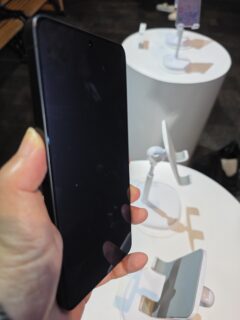
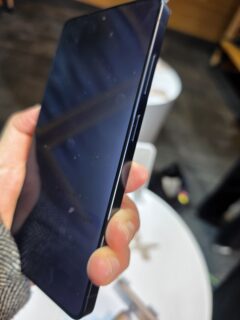
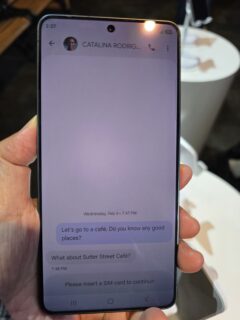
Top to bottom: Privacy Display side-angle visibility and front-facing user view
© Smart Analytics Global (SAG), Proprietary IPR
Back
